5 Tips and Tricks for Printing the Parts You Actually Need
October 12, 2026
Key Takeaway:
A good part is decided before printing. Start by defining what it has to do: that guides the material (the best fit, not necessarily the strongest), the orientation (load running along the layers), the design (soft overhangs, solid walls) and the fit (0.2 to 0.4 mm of clearance). If you are unsure, tell us what the part is for and we will help you choose.
Printing the Part You Actually Need
A part that prints without errors is not always a part that does its job. Most failed 3D prints are not machine problems: they come from decisions made before the file is sent, about function, material, orientation, design and fit.
At Celette, we have spent years using 3D-printed jigs and tooling in the collision repair industry, and today we use that experience to print whatever our customers need. This article gathers five practical tips for FDM (fused deposition modeling) that help you get the part you actually need, not just the part you drew.
Tip 1: Start with the job, not the file
Before you hit print, answer one question: what does this part have to do? The answer drives the material, the orientation and the print settings, so it is owrth a minute of throught.
A few questions usually cover it:
- Load: will the part carry weight, take impacts or be clamped under force?
- Heat: will it sit near an engine, a heater of direct sunlight?
- Chemicals: will it meet oils, fuels, solvents or cleaning products?
- Outdoors: will it face rain, UV or temperature swings?
- Tight fit: does it have to assemble with other parts?
A visual moch-up and a jig that is used every day in a workshop are very different parts, even when the CAD file looks the same. Teeling us what the part is for is often the fastes way to get it right the first time.
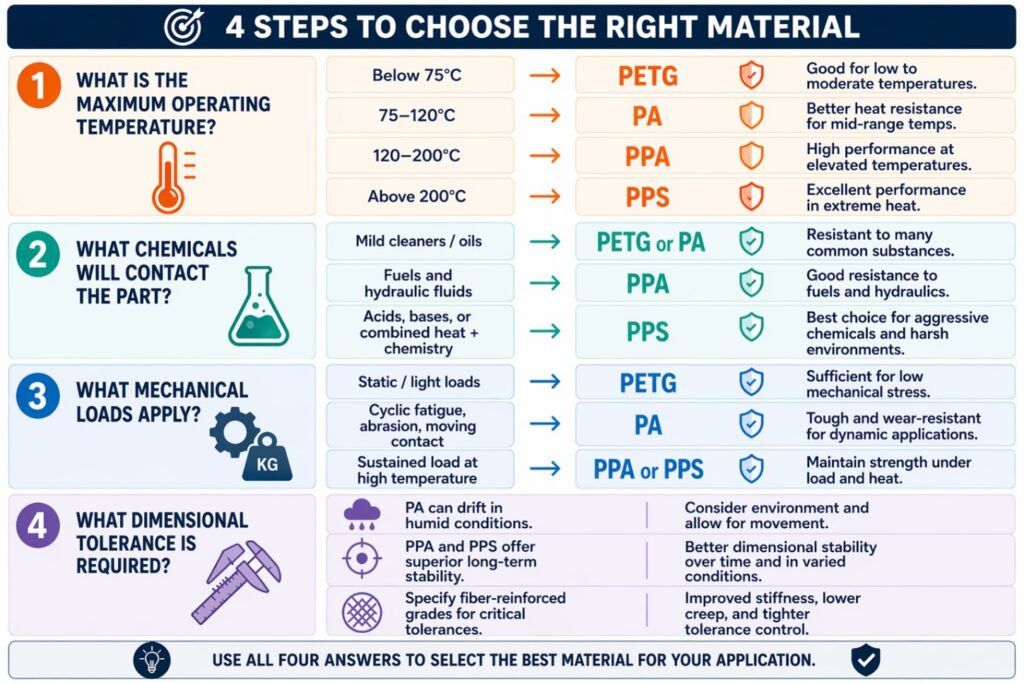
Tip 2: Match the material to the use
The strongest filament is not always the right one. Pick the material for the job the part will really do, using what you defined in Tip 1.
| Material | Best for | Typical use |
|---|---|---|
| PLA-CF | Looks and fit checks | Cosmetic parts and quick form checks |
| PA6-CF | Strength and toughness | Functional parts under real load |
| PPS-CF | Heat and chemicals | Parts in hot, aggressive environments |
All three are carbon-fiber reinforced, which makes parts stiffer and more dimensionally stable than their unfilled versions. Choosing a more demanding material that you need adds cost without adding value, while choosing a weaker one risks a part that fails in service.
Tip 3: Orient the part for strength
An FDM part is strongest along its layers and weakest between them, because each layer is bonded to the one below rather than being one continuous solid. Turn the part so the main load runs with the layers, not across them.
Think of a stack of plates. Pulling a plate sideways is hard; pulling the stack apart layer from layer is easy. A hook, a clip or a bracket printed with its load across the layers can snap along a layer line at a fraction of the force it would otherwise take.
Orientation also affects surface finish and the amount of support material needed, so the best choice is a balance. When strength matters, put it first.
Tip 4: Design for how it is printed
A few small choices in the CAD model save supports, print time and failed parts.
- Soft overhangs: keep overhangs under about 45° so the printer can build them without much support. Steeper angles need support material, which adds time and leaves marks.
- Rounded corners: add fillets on inside corners. A sharp inside corner concentrates stress and is where parts tend to crack, while a fillet spreads the load.
- Solid walls: thicken whatever carries load. Thin walls print weak, and very thin features may not print at all.
The same logic applies to your STL export: a clean, closed mesh with smooth curves gives the slicer a clear description of the part.
Tip 5: Leave room and test the fit
Printed holes and pegs rarely match the CAD model exactly. Where two parts must assemble, add clearance: 0.2 to 0.4 mm is a typical range for mating parts. Our standard tolerance is ±0.2 mm, so a clearance below that risks parts that will not go together
For anything with a tight fit, print a small test piece first, for example just the hole and the peg, and check it before committing to the full part. It costs little and can save a full reprint.
Also check the size early. Our printers handle parts up to 240 × 200 × 200 mm, and larger parts can be split into pieces that assemble.
Not sure? Send us your file
The right part comes from five decisions: the job it does, the material, the orientation, a design made for FDM, and a fit you have tested. If you are unsure about any of them, tell us what the part has to do. We will recommend the right material and orientation, and ship it anywhere in the world.
Upload your STL file for a quote at 3dprint.celette.com, no registration required